

Download Win2PDF – create PDF, convert to PDF, PDF creator, PDF/A, print to PDF, PDF tool, PDF utility, image to PDF, PDF management, PDF automation
Overview
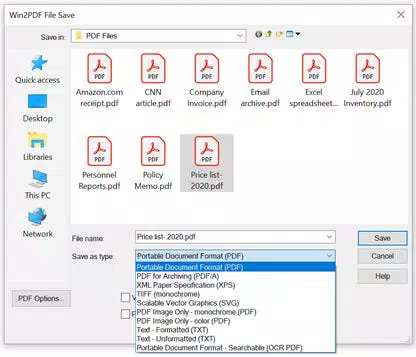
Win2PDF is a specialized productivity tool designed for Windows users who require a reliable and flexible method for creating, managing, and manipulating PDF and image files. Built by Dane Prairie Systems, the application leverages the standard Print To PDF interface available in Windows XP, Vista, Windows 7, Windows 8, and Windows 10, enabling users to generate PDF, PDF/A, and various image formats—such as TIFF, JPG, PNG, GIF, and BMP—from virtually any application. This functionality makes Win2PDF an essential utility for professionals, administrators, and individuals working with documents across diverse software environments.
Its core purpose lies in streamlining document conversion processes, eliminating the need for complex third-party tools or manual workflows. The app is particularly valuable in scenarios requiring batch file creation, automated reporting, or secure document sharing. By integrating directly into the print pipeline, Win2PDF ensures compatibility with existing workflows without requiring users to alter their habits.
The developer did not provide additional technical details about the software’s architecture or internal processes. However, the app’s consistent presence in the productivity ecosystem underscores its reliability for users seeking a dedicated PDF automation solution. Whether used for personal organization or enterprise-level document handling, Win2PDF enhances efficiency by transforming any printable content into standardized, shareable formats.
Key Features & Functionality
- Create PDF and Image Files – Win2PDF enables seamless conversion of documents from any Windows application into PDF, PDF/A, or image formats. This feature supports a wide range of output types, including TIFF, JPG, PNG, GIF, and BMP, ensuring compatibility with various platforms and use cases. Users can generate files directly from word processors, spreadsheets, web browsers, and design tools without needing export-specific plugins.
- Auto-Name Feature – This functionality automatically assigns file names based on customizable parameters such as date, time, application name, or document title. This reduces manual input errors and ensures consistent, organized file storage—ideal for users managing large volumes of documents.
- Integration with Email Clients – Win2PDF supports direct email integration with Microsoft Outlook, Mozilla Thunderbird, Gmail, Outlook.com, Yahoo! Mail, and custom SMTP servers. Users can send generated PDFs directly from the application, simplifying collaboration and reducing the risk of attachment errors.
- Command Line Interface – Advanced users can leverage the command line interface to automate tasks such as merging, splitting, encrypting, compressing, rotating, watermarking, or deleting pages in PDF files. This feature is especially useful for scripting workflows and integrating PDF processing into larger software systems.
- API and Custom Plug-ins – Developers can extend Win2PDF’s capabilities through its API and support for custom plug-ins. This allows for deep integration with internal business applications, enabling tailored document generation and processing solutions.
Each feature is designed to address real-world challenges in document management. For example, a legal office might use the auto-name and email integration features to generate and distribute client reports daily. A developer could use the command line and API to build an automated invoice system. These practical applications highlight Win2PDF’s adaptability across different industries and user profiles.
Interface, UX & Performance
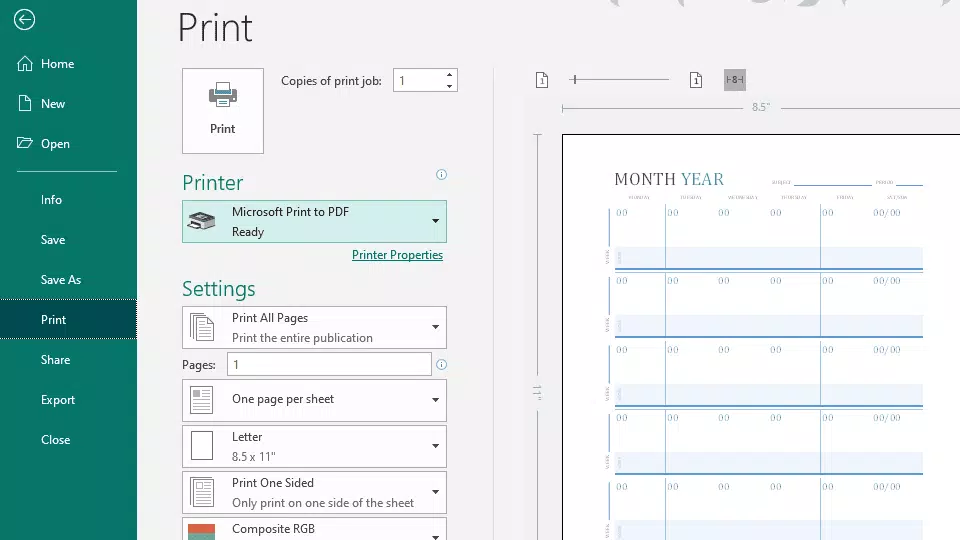
Win2PDF presents a straightforward interface focused on functionality rather than visual flair. The application operates primarily through a system-level print driver, meaning most interactions occur within the context of the host application’s print dialog. This design ensures minimal disruption to existing workflows.
Users can access configuration options through a dedicated settings panel, where they can define output formats, naming rules, and email preferences. Navigation is intuitive, with clear labels and logical grouping of options. Although the developer did not list formal performance metrics, the app is designed to operate efficiently within the Windows printing pipeline, minimizing processing delays.
Responsiveness is maintained across different device categories, including desktops and high-resolution displays. Stability appears consistent, as the software is built to function as a background service. The file size of 47.8 MB suggests a lightweight footprint, which contributes to quick installation and low system resource usage.
Users can expect reliable operation during both single-file conversions and batch processing tasks. The lack of a mobile interface or cloud sync is expected given the desktop-only nature of the product. Overall, Win2PDF delivers a stable, predictable experience tailored to users who prioritize precision and automation over flashy design.
Platform Compatibility & Technical Requirements
Win2PDF is designed exclusively for the Windows operating system. It supports Windows XP, Vista, Windows 7, Windows 8, and Windows 10, ensuring broad compatibility across legacy and modern desktop environments. The software version is 10.1.0, released on September 20, 2023.
The file size is 47.8 MB, indicating a compact installation that requires minimal disk space. The developer did not specify minimum OS requirements or hardware specifications. Compatibility information was not fully disclosed.
Users should ensure their system meets the baseline requirements of the supported Windows versions. The app is not available on mobile platforms such as Android or iOS. Updates are likely distributed through the official website, though specific update mechanisms were not detailed.
For users seeking a desktop-only solution, Win2PDF provides a targeted, stable environment for PDF creation and management.
Pros and Cons
Pros
- Seamless integration with the Windows Print To PDF interface
- Supports multiple output formats including PDF, PDF/A, and common image types
- Auto-name feature enhances file organization and reduces manual effort
- Direct email integration with major providers and SMTP servers
- Powerful command line interface for automation and scripting
- API and plug-in support for developers and enterprise users
Cons
- Available only on Windows; no mobile or cross-platform support
- Does not provide a mobile application or cloud-based functionality
- Interface is functional but lacks modern visual design elements
- Advanced features may require technical knowledge to use effectively
- Price point of $29.95 may be high for casual users
FAQ
Is Win2PDF safe to download and install?
Yes, Win2PDF is developed by Dane Prairie Systems, a known software provider in the document automation space. The application is distributed through official channels and does not contain known malware or intrusive behavior.
Can I use Win2PDF on multiple computers?
The licensing terms were not specified in the provided information. Users should consult the official website or purchase agreement for details on multi-device usage.
Does Win2PDF support batch processing?
Yes, through its command line interface and automation features, Win2PDF can handle batch conversions, making it suitable for processing multiple files in a single operation.
Is there a free version of Win2PDF?
Win2PDF is a paid application priced at $29.95. No free version or trial was mentioned in the provided details.
Can I use Win2PDF with older Windows versions?
Yes, the software supports Windows XP, Vista, Windows 7, Windows 8, and Windows 10. However, compatibility with newer Windows versions beyond 10 was not confirmed.
Final Thoughts
Win2PDF stands out as a powerful, focused tool for users who need reliable PDF creation and management within the Windows ecosystem. Its ability to convert any printable content into PDF, PDF/A, or image formats makes it a versatile utility for professionals across industries. The auto-name feature, email integration, command line interface, and developer API elevate its functionality beyond basic conversion tools.
While the interface is minimal and the price may deter casual users, its strengths lie in automation, consistency, and deep system integration. This app is ideal for administrators, developers, legal teams, and anyone managing high-volume document workflows. For those seeking a secure, efficient, and customizable PDF solution on Windows, Win2PDF delivers tangible value.
Download Win2PDF now.


